If you connect your own email mailbox, the Hub sends your emails to customers from your own address. Quotes, invoices, payment reminders, confirmations and messages from the conversation then appear in your “Sent” folder. When your customer replies, you see the reply in the Hub with the customer and the request.
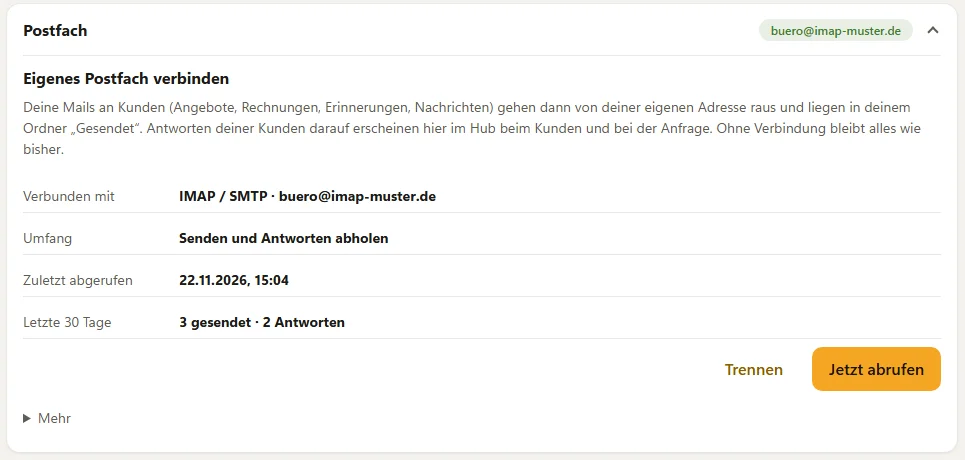
Connecting
Under Bookings → Settings → Mailbox you choose your provider:
- Other mailbox (IMAP/SMTP) – for all other providers, for example IONOS, Fastmail or Yahoo. Enter the address, the IMAP server (incoming), the SMTP server (outgoing), the username and the password. If your provider offers app passwords, use one. The Hub checks the sign-in before it saves.
Only owners and managers can connect and disconnect.
What changes
- Sender: your address and your company name. The email looks the same as before – with your logo, your colour and your legal notice.
- Sent: every email is in your mailbox. With IMAP, the Hub puts a copy in your “Sent” folder.
- Replies: the customer replies as usual. The reply arrives in your mailbox and, every few minutes, also in the conversation with the customer, marked by email. Under Full email you see the complete email. You download attachments there. Check attachments with your antivirus before opening them.
- On the request, the Customer & date section shows the Emails for this booking.
When you reply in the conversation, your reply is also sent from your mailbox and attaches to the customer’s last email.
What the Hub reads – and what it doesn’t
The Hub only imports replies to emails it sent through your mailbox itself. It recognises them by the reference of the original email. It does not read or store any other emails in your inbox. It does not delete, move or mark anything. It does not import automatic replies such as out-of-office notes and delivery failure notices.
Under More you can add a reference to the subject, for example [BD-K7Q2M8XA]. The Hub then matches a reply even when an email program removes the references. With IMAP, the reference is already switched on.
If something doesn’t work
If the connection is disrupted or access has expired, you see this in the Mailbox header. Your emails are then sent via BoothDock as before, with your address as the reply address. So no email gets lost. If access has expired or you have changed your password, disconnect the mailbox and connect it again. Check now fetches new replies immediately, at most once per minute.
Disconnecting
Disconnect deletes your credentials immediately. After that, emails are sent via BoothDock again. Replies already imported stay in the conversation until you delete the customer. If needed, also remove the app password at your email provider.
Privacy
The Hub stores your credentials encrypted. Imported replies are your customers’ data, which BoothDock processes on your behalf. The Hub deletes attachments after 180 days. Mention in your own privacy policy that you process customer emails through your mailbox and BoothDock.
Sample text for your privacy policy
If you have connected your mailbox, add this paragraph to your own privacy policy:
Emails via our own mailbox – We send our emails about your requests and bookings through our own email mailbox, technically connected via BoothDock as our processor. If you reply, BoothDock matches your reply to your request and shows it to us together with our previous messages; for this purpose we store the sender, subject, text and attachments of your reply. We delete attachments there after 180 days, and the other details when we delete your customer data. The legal basis is the performance of our contract with you or steps taken prior to entering into it (Art. 6(1)(b) GDPR) and our legitimate interest in organised customer communication (Art. 6(1)(f) GDPR). We have a separate contract with the provider of our mailbox. We use BoothDock as our processor: Daniel Rau, trading as BoothDock, Herrweg 7, 52511 Geilenkirchen, Germany.
This sample text is not legal advice. Please adapt it to your own privacy policy.