The booking module bills in your country, your currency and your time zone. You set everything under Bookings → Settings → Company & tax (currency and time zone under Advanced).
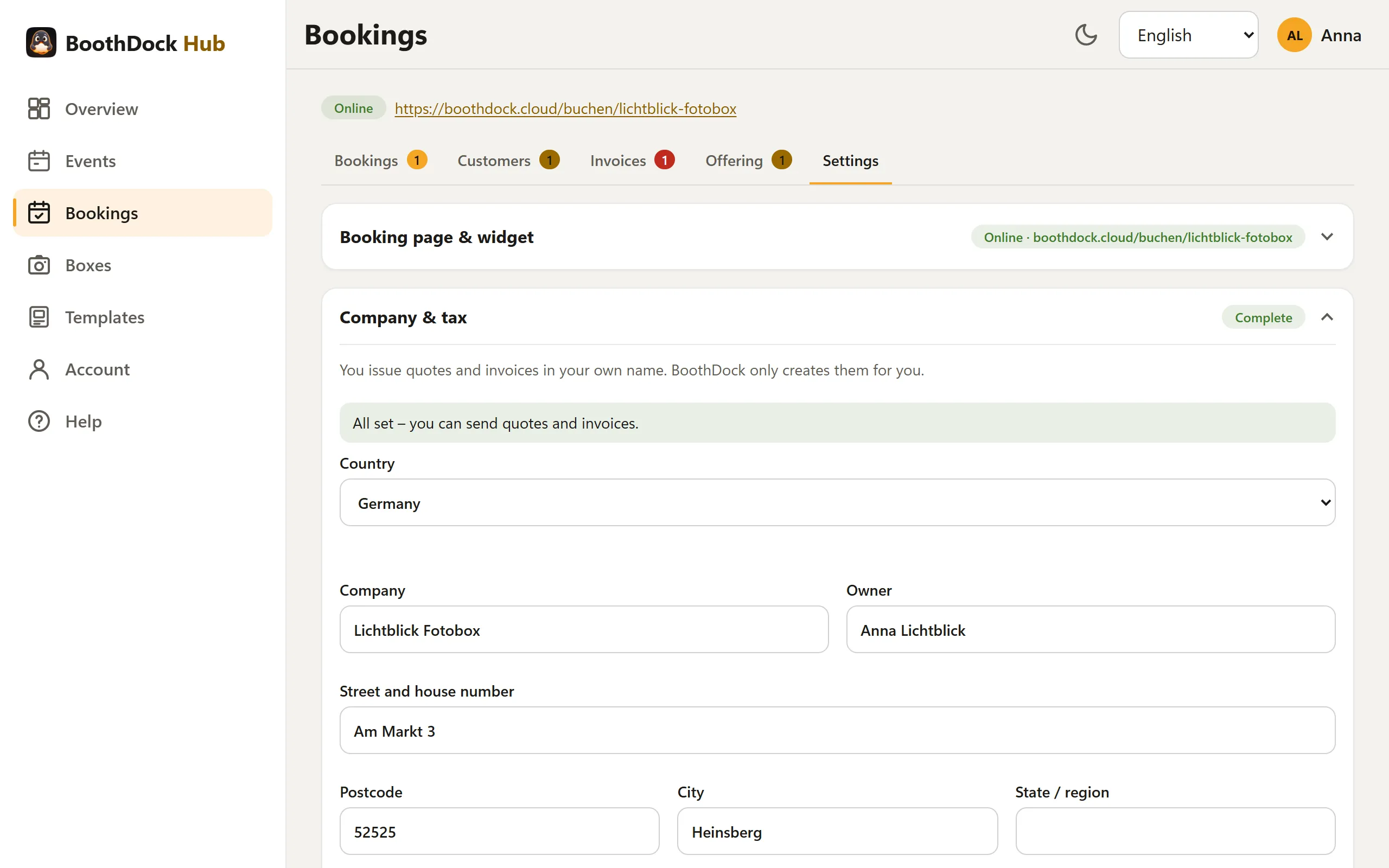
Choose your country
First choose your Country. It sets defaults for Currency, Time zone, Taxation, tax rates, the tax exemption note, the bank details format and the document number prefixes. You can change all defaults afterwards.
Available are Germany, Austria, Switzerland, Luxembourg, the Netherlands, Belgium, France, Italy, Spain, Portugal, Ireland, Poland, Czechia, Sweden, Denmark, Norway, Finland, the United Kingdom, the USA, Canada and Australia.
Except for Germany, the defaults are suggestions. The Hub points this out: “The defaults for this country are suggestions – please have your tax advisor check the note and rates.” BoothDock does not give tax advice.
Currency and time zone
- Currency: the booking page, quotes, invoices, customer portal and Stripe use your currency. Available are EUR, CHF, GBP, USD, CAD, AUD, NZD, PLN, CZK, SEK, DKK, NOK, RON and HUF. With VAT, you bill in the national currency.
- Time zone: this determines “today”, the bookable period, due dates and the daily run for reminders and final invoices.
Taxation
| Taxation | What happens on quote and invoice |
|---|---|
| VAT-exempt (small business) | No VAT. The Note on every invoice is mandatory and prefilled per country, in Germany “Gemäß § 19 UStG wird keine Umsatzsteuer berechnet.” |
| Standard VAT | VAT at your rates under Tax rates in % – separated by semicolons, the first is the default, e.g. 19; 7; 0. Under Prices in the catalogue you choose gross or net. In the quote you choose the rate per line item. |
| No VAT (e.g. USA) | No tax lines on the documents. |
Enter your numbers under Tax number and VAT ID. Where your country requires it, one of the two must appear on every invoice. Other mandatory details for your country – such as register court, company registration number, managing directors or SIRET – go into Additional footer details. You mainly need the State / region field in the USA, Canada and Australia.
Bank
Under Payment & Stripe → Bank details you choose the Format:
| Format | Fields |
|---|---|
| IBAN (SEPA, Switzerland) | IBAN, BIC, bank |
| United Kingdom (sort code) | Sort code, account number, bank |
| USA (routing number) | Routing number, account number, bank |
| Canada (institution/transit) | Institution number, transit number, account number, bank |
| Australia (BSB) | BSB, account number, bank |
| Free text only | only Other payment details |
In addition there are Account holder and Other payment details, e.g. Bankgiro, KID, PayID or Interac e-mail. Everything appears in the customer portal and on the invoices. The Hub checks the numbers when you save.
Document numbers
Under Settings → Documents & export → Advanced you set the prefixes for Quote, Deposit invoice, Final invoice and Cancellation (1 to 6 letters or digits). BoothDock counts the numbers per year without gaps. Prefilled are, for example:
| Country | Quote | Deposit | Final | Cancellation |
|---|---|---|---|---|
| Germany, Austria | AG | AR | RE | ST |
| Switzerland | OF | AR | RE | GS |
| France, Luxembourg | DEV | AC | FA | AV |
| Netherlands, Belgium | OFF | VF | F | CN |
| United Kingdom, Ireland, USA, Canada, Australia | QU | DP | INV | CN |
Where the invoice must be created
In some countries, invoices must go through a government system or certified software. If you choose such a country, the Hub shows a note below the country:
| Country | Note in the Hub |
|---|---|
| Italy, Spain, Portugal, Poland | BoothDock handles booking and payment; you create the invoice in your accounting software. |
| Belgium | Invoices to business customers go through a government e-invoicing network – create them in your accounting software. You can invoice private customers here. |
| France | From 1 September 2027 the same applies to invoices to business customers; the note then appears automatically. |
In Germany, the ZUGFeRD PDF meets the e-invoicing requirement for business customers. In the other countries, the XML file is an add-on for accounting software. The rules keep changing (as of October 2026) – if in doubt, check with your tax advisor what applies to you.