Boo, the assistant in the Hub’s support chat, does more than answer questions. He also looks into your account and can take care of small tasks for you. But nothing is carried out until you confirm it.
Questions about your account
Ask Boo in the Hub under Help or via the round chat button, for example:
- “Is my box online right now?”
- “Which events do I have in December?”
- “Where do I find the gallery link for my event on Saturday?”
- “What has happened since yesterday?”
For this, Boo reads the current data of your account and answers with it. This works on every plan.
Help with your printer
If you ask “How do I change the paper?” or “What does this error mean?”, Boo recognises your box’s printer and first gives you our help articles, then the manufacturer’s official guides and videos. You find the same links in the Hub under Boxes in the details of a box next to the printer: Help for this printer. If a video is only available in English, this is noted.
Boo takes care of tasks (Pro)
With BoothDock Pro, Boo can suggest an action to you:
- send a gallery by e-mail, for example “Send the gallery link from the event … to … again”,
- send a command to a box: fetch settings, install an update or restart a device via the smart plug,
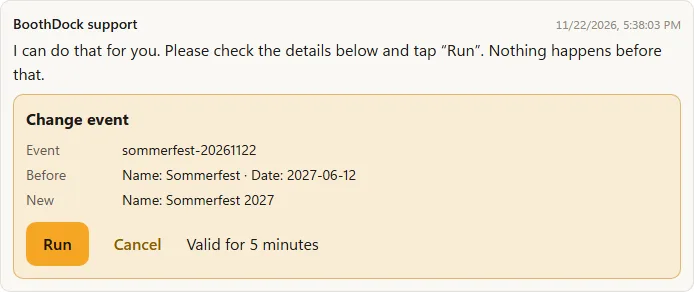
- change an event: name, date, customer or template.
Boo shows you a preview with all details, for example recipient, text and box. Only when you tap Run does anything happen. With Cancel you discard the suggestion. The preview is valid for 5 minutes. Afterwards the chat tells you whether it worked, and the action appears in your account’s audit log.
What Boo does not do
- Boo does not delete anything and does not make payments.
- Boo never acts on his own, only when you ask him and confirm.
- Per account and day there are at most 30 queries and 10 actions. After that, a person from our team is happy to help you in the chat.
If you would rather talk to a person, just write that in the chat.